Collect Vrex logs and email them to Support
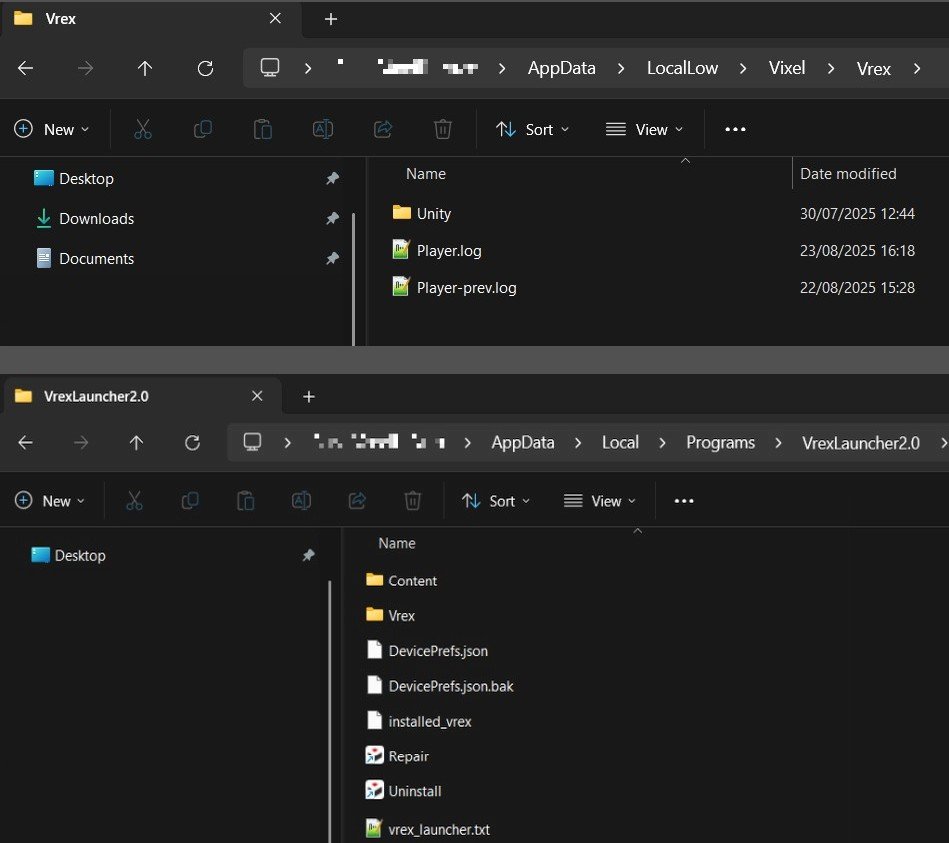
Goal of this guide is to get logs and email them to Vrex support support@vixel.no , or your support contact. What you’ll send:- **Player.log**- Player-prev.log****`-`** Vrex_launcher.txt**
Step-by-step
- Open File Explorer.
- Go to this folder:
C:\users\<windows_username>\AppData\LocalLow\Vixel\Vrex\ - Open File Explorer.
- Go to this folder:
C:\users\<windows_username>\AppData\LocalLow\Vixel\Vrex\ - Add the files “player.log” and “player-pre.log” to an email as attachment.
- Repeat the process for this folder, to attach “vrex_launcher.txt**”** to the same email.
C:\users\<windows_username>\AppData\Local\Programs\VrexLauncher2.0\

Send it to your Vrex Support contact, or to support@vrex.no
Shortcut: Quick way to open the log-files folder
- Click the “Copy” button below, or copy the text
- Press the WIN+R buttons on your keyboard
- CTRL+V to paste into the text field, and hit ENTER
Vrex App folder
%USERPROFILE%\AppData\LocalLow\Vixel\Vrex\
Repeat to open the Vrex Launcher folder
%USERPROFILE%\AppData\Local\Programs\VrexLauncher2.0\
Click to copy path to Vrex App
Click to copy path to Vrex Launcher
Tips: If copy buttons don’t work in your browser, select and copy the text in the blue box manually.
document.addEventListener(‘click’, function (e) { const btn = e.target.closest(’.copy-btn’); if (!btn) return; const text = btn.dataset.clipboard; if (!text) return; e.preventDefault(); const flash = (el, msg=‘Copied! Now paste it into your file-browser’) => { const orig = el.textContent; el.textContent = msg; document.getElementById(‘copy-status’).textContent = msg; setTimeout(() => { el.textContent = orig; }, 3500); }; const legacyCopy = (str, el) => { const ta = document.createElement(’textarea’); ta.value = str; ta.style.position = ‘fixed’; ta.style.opacity = ‘0’; document.body.appendChild(ta); ta.select(); try { document.execCommand(‘copy’); flash(el); } catch (_){ alert(‘Copy failed. Please copy manually.’); } document.body.removeChild(ta); }; if (navigator.clipboard && window.isSecureContext) { navigator.clipboard.writeText(text).then(() => flash(btn)).catch(() => legacyCopy(text, btn)); } else { legacyCopy(text, btn); } }); /* Let long button labels auto-wrap and fit container */ .wp-block-button .wp-block-button__link.is-wrap{ display: inline-block; white-space: normal; /* allow wrapping */ overflow-wrap: anywhere; /* break long strings if needed */ word-break: break-word; /* extra safety */ width: auto; /* shrink-to-fit content */ max-width: 100%; /* don’t overflow container */ text-align: left; /* optional: align text for multi-line */ line-height: 1.3; /* nicer multi-line rhythm */ padding-right: 2rem; /* keep padding consistent if it wraps */ }